Website traffic and event tracking
How do you use Google Analytics 4?
GA4 can show where visitors come from and what they do on your website. Learn which reports to check and how to tell whether inquiry tracking works.

What do visitors do on your website?
- 01A visit
- 02A recorded action
- 03A business conversation
GA4 basics
What you need to know
Start with what the tool does, when to use it, and the first thing to check.
- 01Plain answer
- GA4 tells you what people do after they reach your website: where they came from, what pages they viewed, what they clicked, and whether they took action.
- 02Best for
- Businesses that get traffic but can't tell if visitors are turning into calls, forms, bookings, or expensive silence.
- 03First move
- Confirm GA4 is installed once, then check whether forms, calls, booking clicks, and thank-you pages are tracked as key events.
What is Google Analytics 4?
Google Analytics 4 tracks what happens on your website. It can show how many people visited, where they came from, which pages they viewed, what buttons they clicked, which forms they submitted, and whether traffic is turning into meaningful actions.
- Users are people or devices visiting your site.
- Sessions are visits.
- Events are actions, like page views, clicks, form submissions, scrolls, or calls if they're tracked.
- Key events are the actions you decide matter most.
- Traffic acquisition shows where visitors came from, like Google organic, paid ads, social, direct, referrals, or email.
How can GA4 help you understand website leads?
A local service business doesn't need to obsess over every graph. You need to know which channels bring useful traffic, which pages get attention, and whether visitors become leads.
- A remodeler can see whether service pages, portfolio pages, and contact pages are doing their jobs.
- A contractor running ads can see whether paid traffic behaves differently than organic traffic.
- A cleaning company can see which service pages get visits and which ones lead to calls or form submissions.
- A business owner can compare which channels bring visits and recorded inquiries.
What do the main GA4 reports show?
- Reports snapshot: a quick overview of users, events, key events, and traffic trends.
- Realtime: who is on the site right now and what they're doing.
- Acquisition: where visitors came from.
- Engagement: pages, screens, events, and how people interact with the site.
- Events: tracked actions like page views, clicks, forms, scrolls, and custom interactions.
- Landing pages: where people first enter the site.
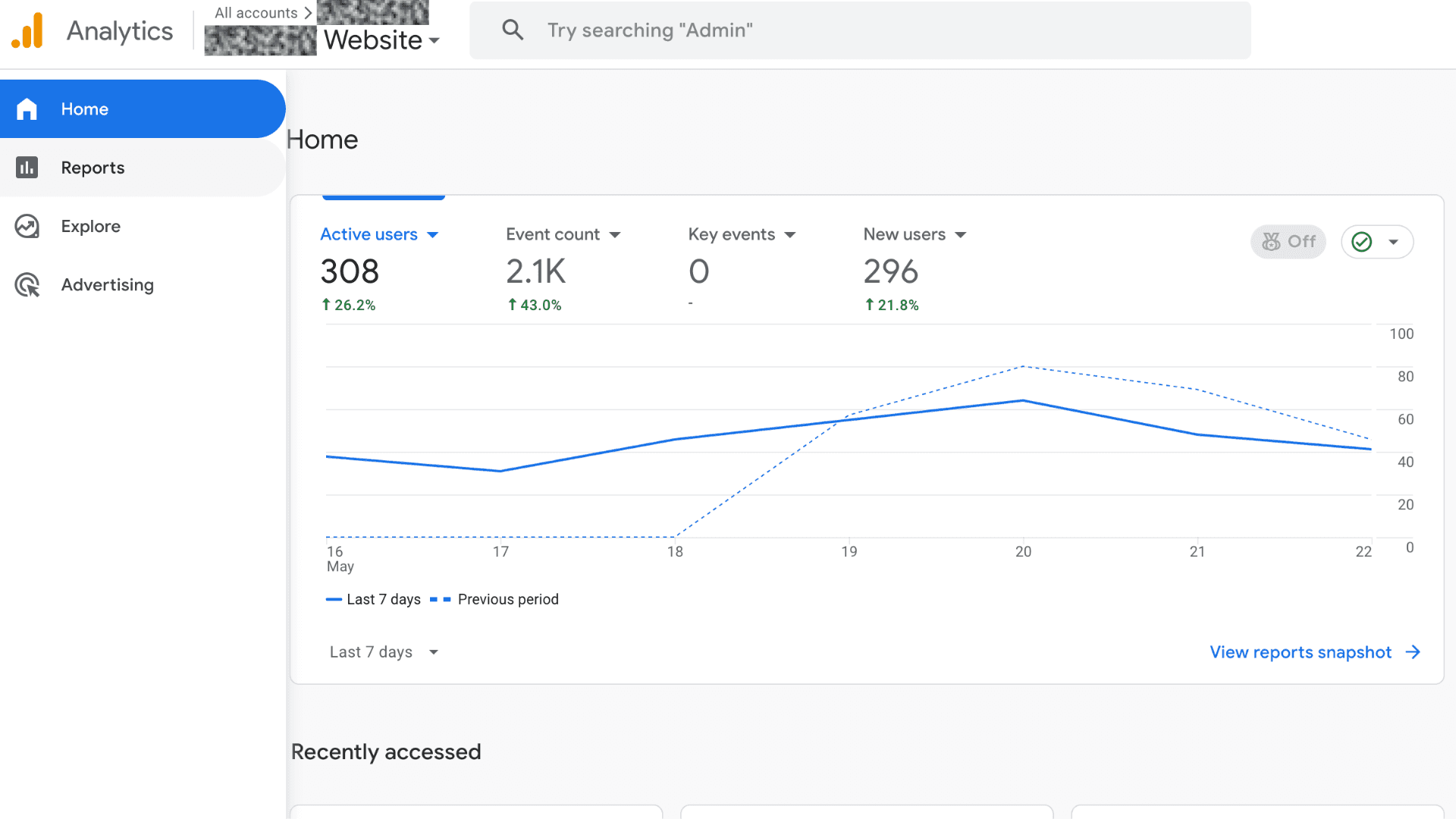
Which GA4 reports should you check first?
- 01
Open GA4 and select the correct account and property.
- 02
Go to Reports, then Acquisition, then Traffic acquisition. Look at Session default channel group to see where traffic comes from.
- 03
Go to Reports, then Engagement, then Pages and screens. Look for your homepage, service pages, case studies, blog posts, and contact page.
- 04
Go to Reports, then Engagement, then Events. Check whether important actions are being tracked, like form submits, phone clicks, email clicks, booking clicks, and quote requests.
- 05
Go to Admin, then Data display, then Events. Confirm important events are marked as key events when appropriate.
- 06
Compare GA4 to Search Console and ad platforms. If one says leads happened and the other says nothing happened, tracking may be broken.
Why might GA4 show the wrong number of leads?
- Thinking GA4 automatically tracks every lead. It doesn't.
- Using page views as proof that marketing is working. Page views are interest, not revenue.
- Ignoring mobile click-to-call tracking.
- Letting ads run without clean conversion tracking.
- Never filtering internal traffic, so your own team makes the site look busier than reality.
How do you improve your website tracking?
- Confirm GA4 is installed correctly and only once.
- Track forms, calls, booking clicks, and email clicks.
- Mark real lead actions as key events.
- Connect GA4 with Google Ads if you're running ads.
- Use UTM links for campaigns that would otherwise get lumped into vague traffic buckets.
Does a phone click or form submission count as a lead?
A phone-link click isn't a completed call. An accepted form isn't a qualified opportunity. Consent and browser behavior limit what GA4 can observe. Test an accepted submission once, invalid and failed submissions, duplicate prevention, and declined consent. Keep names, email addresses, phone numbers, messages, and personal URL values out of Analytics.
Screenshot checklist
What should you screenshot before asking for help?
A good screenshot makes the conversation concrete. It shows whether the tool is set up, whether the numbers are useful, and where the next fix should start.
- 01Home screen with users, events, and key events.
- 02Traffic acquisition report showing source and medium.
- 03Pages and screens report for top landing pages.
- 04Events report showing form submissions, phone clicks, booking clicks, and contact actions.
- 05Admin data stream screen showing the right website URL.
- 06Any key event setup tied to lead actions.
Example problems
What problems might you find?
Each example shows a problem, what it might mean, and what to check.
Website visits are up, but inquiries are down
- What happens
- A contractor had plenty of visitors, but the contact page barely moved and phone clicks weren't tracked.
- What it means
- The site wasn't necessarily invisible. It was failing after people arrived, and the tracking wasn't good enough to prove where.
- The move
- Track the money actions, review the highest-traffic pages, and fix the calls to action where visitors stall out.
Paid traffic landed on the wrong page
- What happens
- Ads were sending people to a general homepage instead of a page that matched the exact service they searched.
- What it means
- The ad did its job, then the page made the buyer work too hard.
- The move
- Use landing page reports to connect traffic source, page, and lead action. Then route ads to pages that answer the buyer faster.
Tasks to work through
What can you check yourself?
Work through these checks in order.
- 01
Don't celebrate traffic until you know whether it became a lead action.
- 02
Track calls, forms, booking clicks, and major CTA clicks.
- 03
Review landing pages by traffic source so SEO, ads, and referrals don't get lumped together.
- 04
Watch engagement, but don't worship it. A buyer can call fast and still be valuable.
- 05
Use GA4 with Search Console and call tracking for a cleaner picture.
Related guides
Related Google and website guides
GA4 gets useful when events, tags, ads, and service pages line up.

When should a tracking tag run?
- 01Visitor action↓
- 02Trigger + consent↓
- 03Measurement tag

Where should your ads send people?
- 01A relevant search
- 02A specific ad
- 03A useful landing page

Which searches bring people to your site?
- 01Search query
- 02Relevant page
- 03Evidence to inspect
Free 30-minute call
Need help with your website or Google profile?
We’ll discuss your website, profile, or measurement questions and identify a useful next step. Thirty minutes, no commitment. Advertising guides are educational; paid campaign management isn’t an advertised service here.