Website Maintenance / Update schedule
How often should you update a contractor website?
Know what to update on your contractor website each month, each quarter, and when your business changes. Includes a schedule and practical checklist.
Before
After
The practical answer
The short answer
Update your contractor website whenever important business information changes. Test the contact options monthly, review your main pages every quarter, and take a broader look once a year. Add finished projects and useful answers when you've got something worth sharing. You don't need a weekly blog or a redesign every few years just to keep the site current.
In this guide
- 01
Update services, contact details, pricing guidance, and service areas as soon as they change.
- 02
Test the contact options monthly and review your important pages every quarter.
- 03
Use completed projects and customer questions to decide what content to add.
- 04
Handle software maintenance separately, and review the website's overall direction once a year.
Your crew's finished better projects. You're taking on different jobs. Maybe you've stopped doing small repairs and want more whole-home remodels. But your website still describes the business you were running three years ago.
That's when a website starts working against you. It can look perfectly fine while showing the wrong services, old photos, or a phone number nobody answers anymore.
For contractors, remodelers, homebuilders, and designers, a useful update schedule follows what's happening in the business. Here's what we'd check, how often we'd check it, and when a small edit needs to become a bigger conversation.
A practical website update schedule for contractors
You don't need to rewrite the website every month. You do need a way to catch wrong information, broken contact options, and pages that no longer match the work you want. Use this as a starting schedule, then adjust it to your business.
| When | What to check or update | What you want to know |
|---|---|---|
| As soon as something changes | Services, service areas, phone numbers, team information, project requirements, and published price guidance. | Will a visitor get the right information today? |
| Monthly | Call and email links, forms, confirmation messages, receiving inboxes, mobile navigation, and missing images. | Can a potential customer actually reach us? |
| After a worthwhile project | Approved photos, the work involved, decisions, constraints, and what changed for the customer. | Where will this example help someone choose us? |
| Quarterly | Homepage, main service pages, project stories, common questions, and relevant search reports. | Does the site still explain the business we want to build? |
| Yearly | Site structure, customer focus, mobile experience, speed, account access, and the support plan. | Can this website support where we're going next? |
| As required by your platform | Software updates, backups, security alerts, renewals, and restoration checks. | Who's responsible, and how do we recover if something breaks? |
Update business information as soon as it changes
Don't wait until the next quarterly review to remove a service you no longer offer or replace an old phone number. Those details affect whether someone contacts you and whether they're a good fit.
Check all the places that repeat the information. If you've stopped offering handyman work, changing one sentence on the homepage won't help much if the service menu, contact form, and old service pages still promote it.
- Services you've added, stopped offering, or narrowed.
- The cities and areas you actually serve.
- Project minimums, consultation fees, and any price guidance you've published.
- Phone numbers, email addresses, business hours, and contact instructions.
- Team members, credentials, warranties, financing, and availability statements.

Update services, contact details, pricing guidance, and service areas as soon as they change.
DewBwah. / A closer lookWhat a useful website update looks like
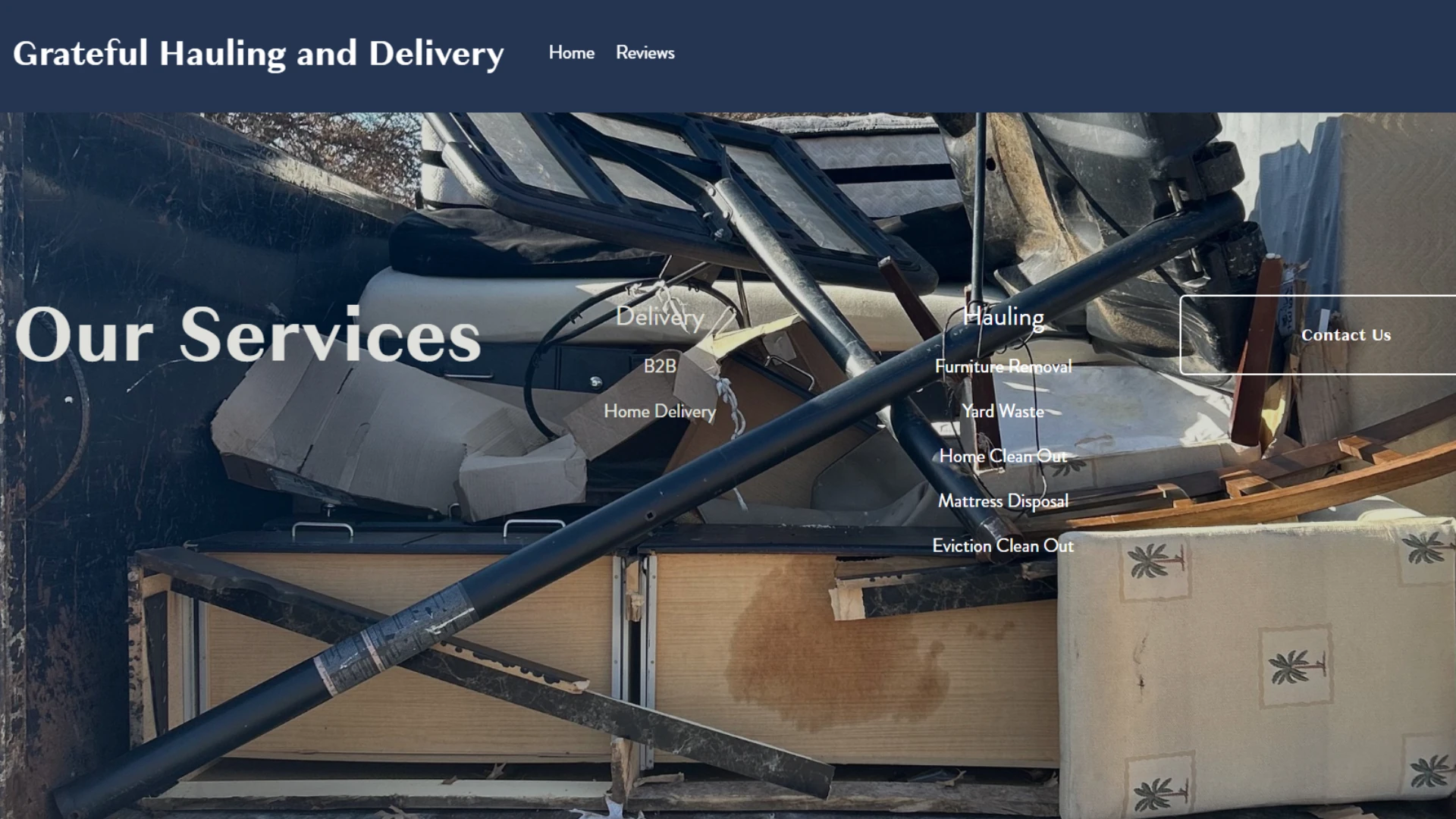
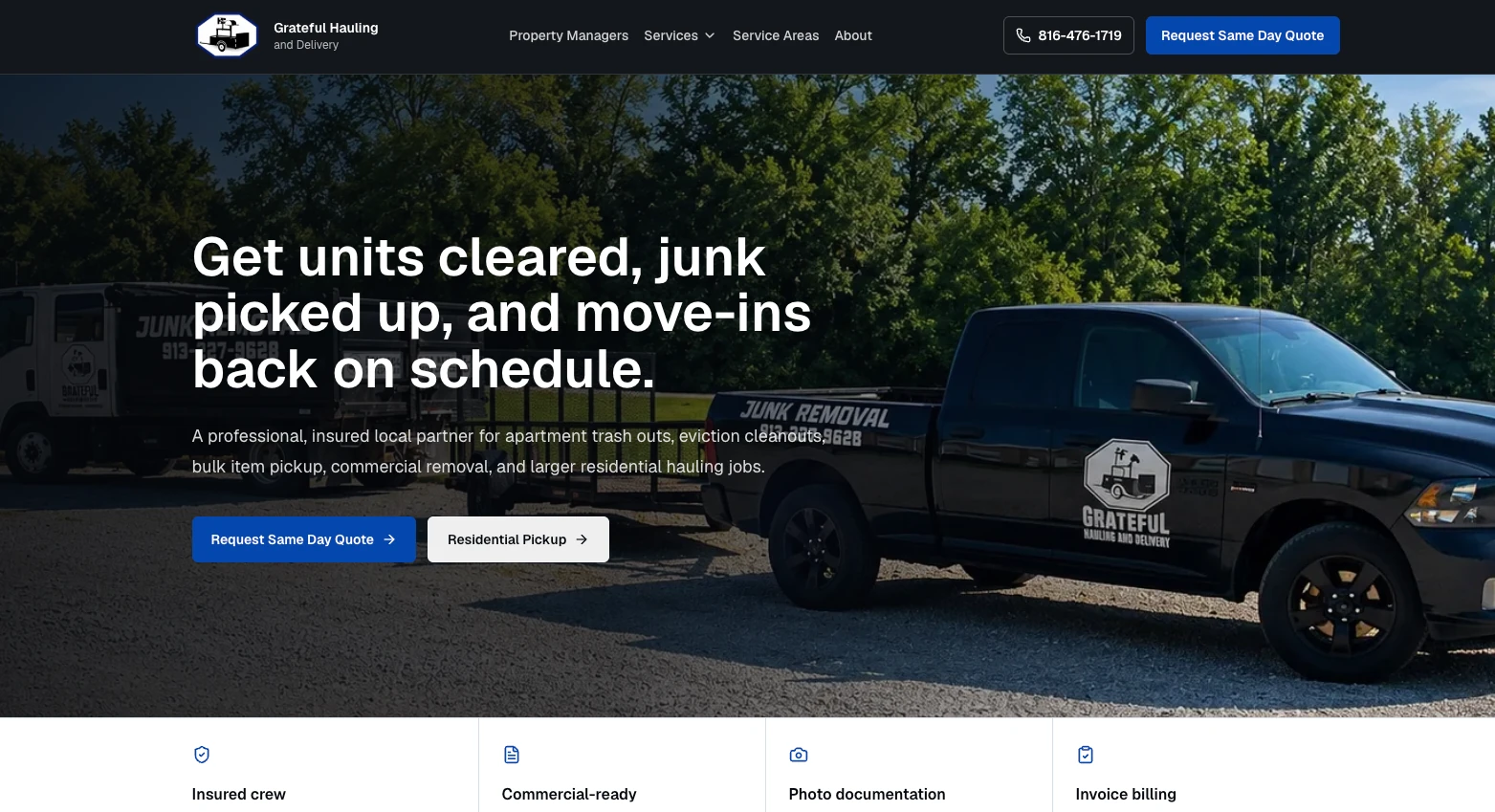
Look at the before-and-after screenshots at the top of this page. The earlier homepage leads with 'Our Services' and lists delivery and hauling options. A visitor has to piece together who the company helps and where to go next.
The updated version speaks directly to property managers dealing with unit cleanouts, junk pickup, and move-in schedules. It explains the work, puts the quote option in plain sight, and gives residential customers a separate place to start.
That lesson applies to a remodeler just as much as a hauling company. If you want more whole-home renovations, your homepage shouldn't leave people thinking you mainly fix loose cabinet doors. Update the message, the project examples, and the next step together.
Our services: kitchens, bathrooms, basements, and repairs. Contact us.
Planning a whole-home remodel? See how we help homeowners work through layout changes, connected living spaces, and the decisions that come before construction.
Once a month, check whether people can reach you
A form can look normal while sending every inquiry to an old inbox. Once a month, use your website the way a potential customer would, starting on your phone.
Submit a clearly labeled test and check that it arrives. A success message on the website doesn't tell you whether the right person received it. If someone else handles the website, ask them to confirm the full test, not just that the button works.
- 01
Start on an important service page.
Open the kitchen, custom home, or design service page a customer is likely to visit. Find the contact option without using the main menu as a shortcut.
- 02
Test each contact option.
Check the phone number, email address, form fields, and confirmation message. Verify that the test inquiry reaches the right person or system.
- 03
Look for mobile problems.
Check whether text is readable, buttons are easy to tap, images load, and popups or sticky bars cover anything important.
Add project content while the details are still fresh
Don't wait until December to sort a year's worth of jobsite photos. After a project you're proud of, capture what happened while the crew still remembers the details.
Write down the project type, general location, starting problem, work involved, constraints, and the decisions that mattered. Confirm which photos and customer details you've got permission to publish.
Then put the example where it helps. A kitchen remodel can strengthen a kitchen service page. A complicated addition may deserve a full project story. You don't need a separate page for every finished job.
- Show the starting problem, not just the finished room.
- Explain important changes in words a homeowner would use.
- Choose photos that help someone understand the work.
- Use outcomes you can describe accurately, and leave private details out.
Every quarter, read the pages that help people choose you
Start with the homepage, main service pages, project stories, and contact page. Also look at pages people regularly reach from search. Read them as someone who hasn't met you, seen your truck, or heard a referral.
You might discover that your best work is buried in an old gallery, the service description is too vague, or the site still attracts jobs you don't want. Those are useful reasons to edit. A page that still answers the right questions doesn't need a rewrite just because three months have passed.
Use this checklist
- Does this page describe the work we want more of?
- Are the service area and project requirements accurate?
- Are the photos and examples relevant to this service?
- Do we answer the questions prospects keep asking about budget, timing, and process?
- Is there a clear, working next step?
- Would a related page help the visitor understand something better?
Does updating your website help SEO?
An update can help when it makes a page more useful, accurate, or easier to understand. A better service explanation or a detailed project example gives people more to work with. Changing a date or replacing a few words just to look active doesn't do the same job.
Google's guidance on helpful content warns against changing dates or adding content just to make a website seem fresh. Update something because the answer, the evidence, or the business has changed.
Use search reports to decide where to look next. Google's Search Console guidance suggests checking around once a month or after content changes. Look at which searches show your pages and which pages get clicks. Our plain-English Search Console guide explains the terms.
If your bathroom page gets attention for the wrong kind of work, the wording may need to be clearer. If an important page isn't showing up at all, check whether Google can find it and include it in search results before rewriting everything. Compare recent months with a similar period, and look at the same season last year when you've got that history. More search clicks aren't automatically more qualified inquiries.
Keep technical maintenance on its own schedule
Content updates and technical maintenance aren't the same job. A page can read perfectly while the software, backups, or form connection behind it needs attention.
Ask whoever maintains the site what they cover and how often they check it. That includes platform and plugin updates where applicable, backups, domain renewals, and alerts about problems. Security fixes should follow the urgency of the issue and the platform's support guidance, not wait for your annual content review.
Know who controls the domain, hosting, and recovery accounts. Ask how a backup would be restored and when that process was last checked. 'We have backups' is a different answer from 'we know how to restore the website.' Use the marketing account ownership checklist to keep access organized.
Once a year, check whether the website still fits the business
Set aside time to look beyond individual edits. Are you selling the same services to the same customers? Have you added a designer, started building custom homes, or moved into a different market? Does the site show the level of work you're doing now?
Review the page structure, navigation, mobile experience, speed, project library, and contact options. Make a short list of what needs to change. Some businesses need a few new examples and clearer copy. Others have outgrown the structure of the website.
Age alone doesn't tell you to rebuild. If the current site lets you make the changes customers need, use it. If every update turns into an expensive workaround, read our repair-versus-rebuild guide before paying for another patch.
Like what you're reading?
Choose DewBwah in Google's preferred-source settingsAvailability depends on Google's source selection. This doesn't guarantee placement in search.
Keep reading
Related website and SEO guides
Related reading on the same problem, so you don’t have to hunt for the next step.


From the guide
More questions about website updates
Straight answers about timing, content, and when a bigger change makes sense.
How often should a contractor update their website?
Update important business information as soon as it changes. Test the contact options monthly, review key pages quarterly, and assess the overall site once a year. Add useful project content when you've got approved photos and details worth sharing. Adjust that rhythm to the size and complexity of the site.
Do contractors need to publish a blog every week?
No. There's no useful weekly quota that fits every contractor. Write when you can answer a real customer question or share worthwhile project experience. If a page already covers the subject well, improve it rather than publish a near-duplicate.
Should I change a blog date to help it rank?
Don't change a date just to make unchanged content look recent. Show an updated date when you've substantially reviewed and improved the article, and keep its original publication date where the website format supports it.
Does every completed project need its own website page?
No. Give a project its own page when you've got enough approved detail to explain the problem, decisions, work, and result. A smaller example may be more useful on the relevant service page.
How do I know whether to update or rebuild my website?
Start with the actual problem. Old photos, inaccurate copy, or a broken form may need focused fixes. Consider a rebuild when the structure or platform prevents the changes your customers need, or makes routine work difficult to maintain.

Let’s start with a conversation
Need help fixing your website?
- Free 30-minute strategy call
- No commitment to a project
- We reply within an hour
You’re requesting a call, not automatically booking a time.